 |
Hamden, CT #2224 11th Hour Clock |
|
I was contacted by Peter Freiler from the Hamden, CT Lodge who wanted to build them a new 11th hour clock. He wrote:
This 11th Hour Clock was given to me by Wallingford Lodge No. 1365 around 2005. The Lodge had refurbished their main hall and purchased a new clock, so it was no longer needed.
I restored this clock in 2013 and used it at the Connecticut Elks Association’s annual convention in Sturbridge, MA. The original clock had a ‘commutator’ made of a motor and arm to make contacts for the hour lights. These were dirty or worn, so I cleaned and adjusted them. The clock operated on 120V power and used incandescent bulbs. I added a remote electrical switch to power the clock and trigger the sequence.
The clock remained in the main office of Hamden Lodge No. 2224 after its use at the convention. When Glastonbury Lodge No. 2202 inquired about that clock model, I looked up information online. I found David Brown's website.
He provided this information on his build: This circuit board was designed for a type of portable clock used by some Lodges. With that clock, only one central light remains on throughout the entire sequence. This clock includes partitions that help illuminate the individual hours and limit the use of a single LED in the center. So I had to find another solution.
Each COB (chip on board) LED (280-350mA, 1W LED Chip Bulb COB Light Beads) used for the hours has a positive and negative connection. The positive connections are all wired in series, leading to a single positive terminal on the circuit board. Each COB LED’s negative side is a ‘home run’ wire to the circuit board. On the circuit board, there is a screw terminal for each hour light’s negative connection (see diagram A).
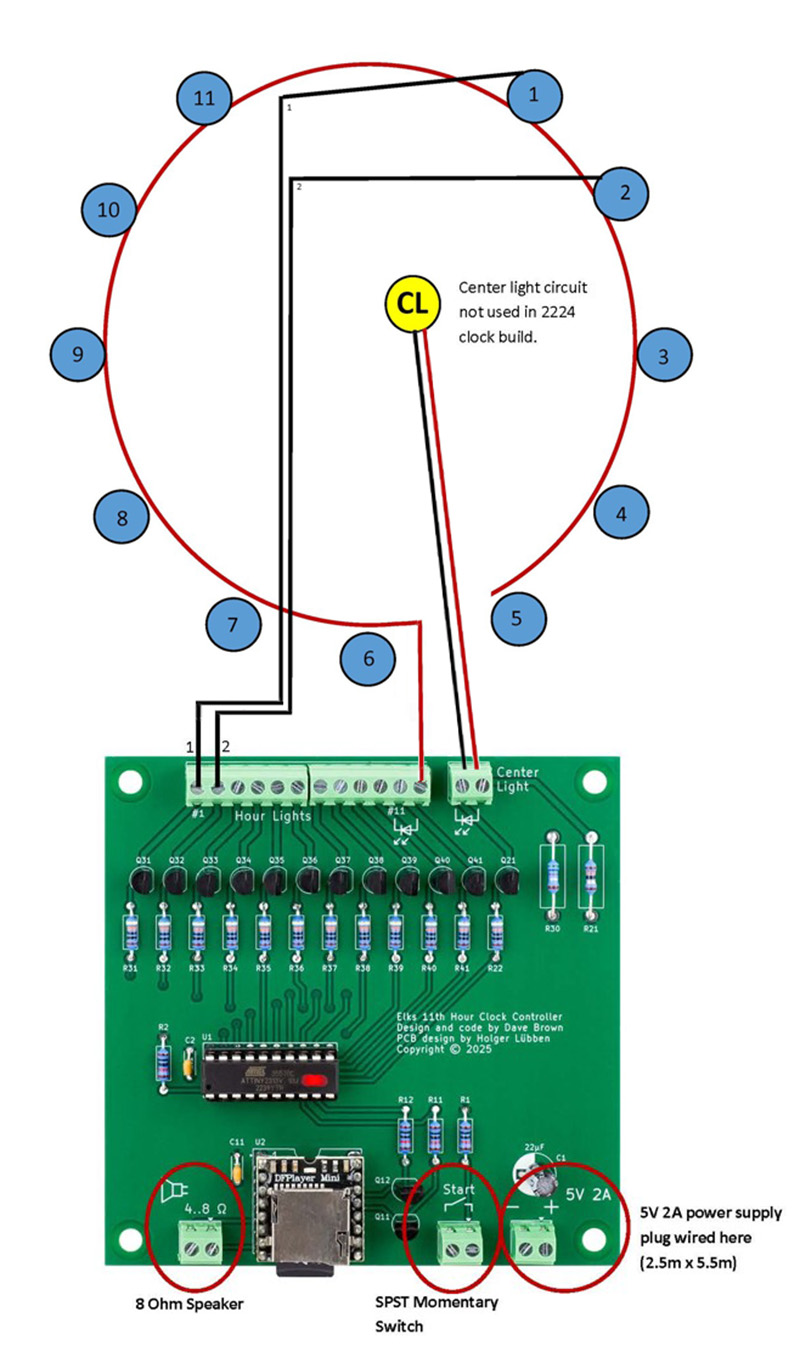
Diagram A
The wiring details can be seen further in Diagram C.
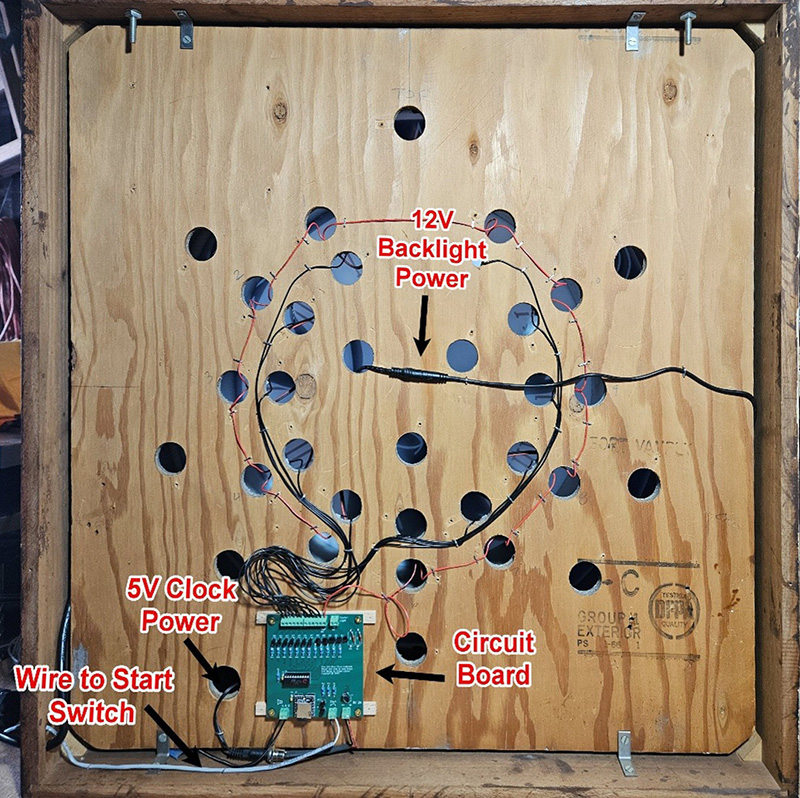
Diagram C
With power connected, pressing the momentary push button wired to the start switch begins the sequence. There are WAV files on the SD card in the MP3 player on the circuit board. The files are 001 Chime.wav, 002 Chime.wav, 003 Chime.wav, 004 Chime.wav, and 005 Final.wav. Each hour light illuminates, the corresponding chime is played, and once all 11 lights have lit and played their chimes, the 11 o’clock light illuminates again and the final chime sounds.
At this point, the only remaining issue was the ‘backlight’ of the clock face. Because of the partitions, each section needed to be illuminated. To address this, I used some 12V LED strip lights powered by a 12V, 1.5A wall-wart power supply. I divided the strip into six LED sections and positioned them within the light divisions (see Diagram B). These are wired in series back to the dimmer switch and USB segment that came with the set. This setup allowed me to have a separate backlight from the 11th-hour sequenced lights.
Both the 5V and 12V supplies are connected to a power strip located on the front of the clock (see Diagram B). The power strip is then plugged into a wireless remote light switch. (The outlet at the clock location at 2224 is not on its own circuit).
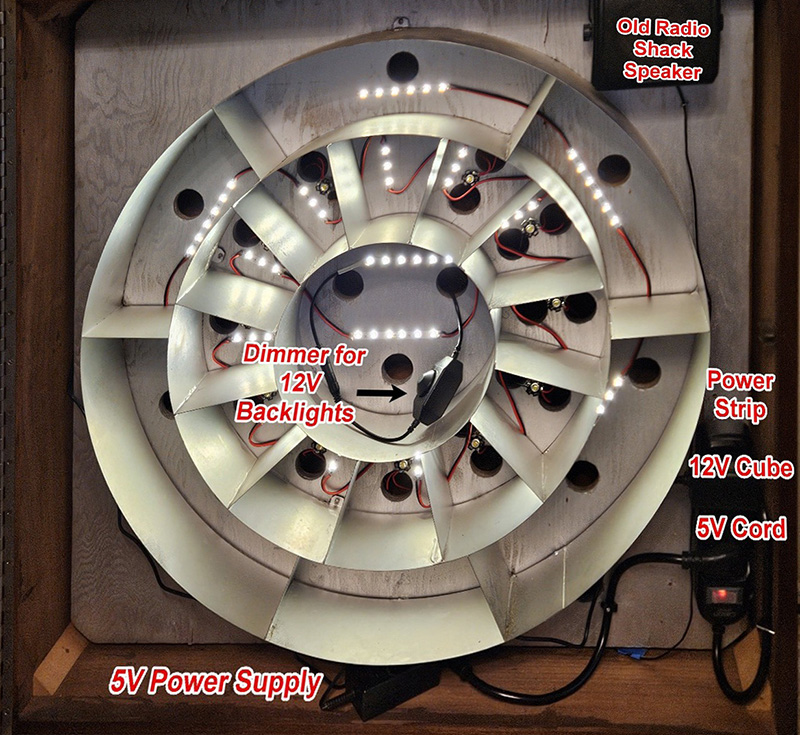
Diagram B
To operate the clock, first turn it on using the wireless remote switch, then press the momentary contact button in the corner of the room.
This is the video of the clock's initial test.
This is a video of the final result. Very nice